Nikon CoolPix 4500Nikon updates the hugely successful Coolpix 995, adding a full 4.0-megapixel CCD!<<Design :(Previous) | (Next): Optics>> Page 4:ViewfinderReview First Posted: 5/29/2002 |
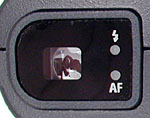 Viewfinder
The Coolpix 4500 offers both an optical viewfinder and a color LCD display screen for composing images. The real-image optical viewfinder zooms along with the lens, but doesn't reflect any digital enlargement from the digital zoom option (which requires the LCD monitor). The viewfinder display features a center focus target for lining up shots, and a set of cropping outlines that show the alignment change required for close up focusing. Two LEDs beside the viewfinder indicate the status of the flash and autofocus systems, each labeled accordingly. The flash LED lights red when the flash is fully charged, and flashes when the flash is still charging. The AF LED glows green when focus is set, and flashes when the camera is having trouble setting focus. A dioptric adjustment dial (-2 to +1 diopter adjustment) is tucked away on the underside of the lens barrel, and adjusts the viewfinder for eyeglass wearers. The Coolpix 4500's optical viewfinder has a fairly high eyepoint as well, which should accommodate most lens thicknesses. In my tests, the optical viewfinder was about 84% accurate across the lens' zoom range. This is about average among digicams I've tested, although still too low, IMHO.
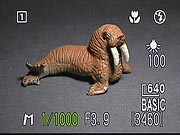 The 1.5-inch, 110,000 dot, low temperature, polysilicon TFT, color LCD monitor
on the back panel operates both as a viewfinder and information display while
in any capture mode. As I first observed on the Coolpix 995, the LCD on the 4500
has a very high refresh rate, so images of moving objects usually appear sharp
and clear. A series of autofocus targets can be continually displayed on the LCD,
to tell you where the camera is judging focus from. The Monitor button controls
the LCD monitor's display, cycling through no display, image and information,
and image only. The information display reports a nice selection of camera settings,
including aperture and shutter speed (when in Manual capture mode). The 4500's
LCD monitor tested out at 96% accuracy. This is pretty good coverage, but I really
prefer a full 100% display in LCD viewfinders.
The 1.5-inch, 110,000 dot, low temperature, polysilicon TFT, color LCD monitor
on the back panel operates both as a viewfinder and information display while
in any capture mode. As I first observed on the Coolpix 995, the LCD on the 4500
has a very high refresh rate, so images of moving objects usually appear sharp
and clear. A series of autofocus targets can be continually displayed on the LCD,
to tell you where the camera is judging focus from. The Monitor button controls
the LCD monitor's display, cycling through no display, image and information,
and image only. The information display reports a nice selection of camera settings,
including aperture and shutter speed (when in Manual capture mode). The 4500's
LCD monitor tested out at 96% accuracy. This is pretty good coverage, but I really
prefer a full 100% display in LCD viewfinders.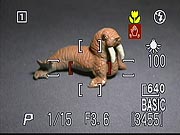 The
Coolpix 4500 features Nikon's powerful zone-based autofocus system. The camera
can automatically select between five different autofocus zones, or you can lock
it in on any one of them manually. Either way, the viewfinder highlights the currently
active zone in red.
The
Coolpix 4500 features Nikon's powerful zone-based autofocus system. The camera
can automatically select between five different autofocus zones, or you can lock
it in on any one of them manually. Either way, the viewfinder highlights the currently
active zone in red.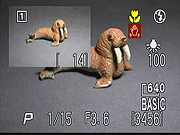 A
particularly nice feature that was new on the 995, but is now common across the
high end of the Coolpix line is the "quick review" function. This lets
you quickly check the last exposure while still in Record mode, simply by pressing
the Playback button. I liked the "picture in picture" review mode (shown
here), which opens a playback window in the upper left-hand corner of the display
screen, keeping the viewfinder image live on the remaining LCD area. Note too,
that this image isn't restricted to the most recently captured photo. You can
scroll through all the images on the memory card by pressing the rocker button
arrows. The first press of the Playback button activates the picture in picture
review mode, a second press enables full-screen playback, and a third press returns
you to full capture mode. At any point, pressing the Shutter button returns you
to capture mode and snaps a picture. Very slick!
A
particularly nice feature that was new on the 995, but is now common across the
high end of the Coolpix line is the "quick review" function. This lets
you quickly check the last exposure while still in Record mode, simply by pressing
the Playback button. I liked the "picture in picture" review mode (shown
here), which opens a playback window in the upper left-hand corner of the display
screen, keeping the viewfinder image live on the remaining LCD area. Note too,
that this image isn't restricted to the most recently captured photo. You can
scroll through all the images on the memory card by pressing the rocker button
arrows. The first press of the Playback button activates the picture in picture
review mode, a second press enables full-screen playback, and a third press returns
you to full capture mode. At any point, pressing the Shutter button returns you
to capture mode and snaps a picture. Very slick!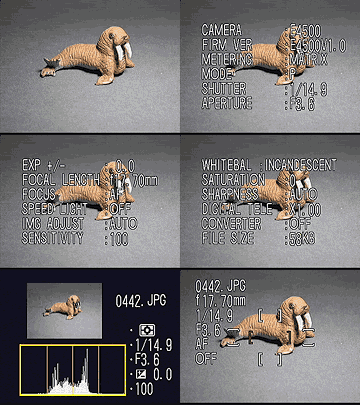 In
Playback mode, the LCD offers a wealth of information via several display pages.
In total, no fewer than six information screens are available, accessed by turning
the Command wheel. The first display is the standard Playback information readout,
which reports the date and time of the shot, file name, quality setting, and the
image number on the card. The next three screens show a long listing of camera
and exposure settings, including the firmware version, focal length, shutter speed,
ISO, etc. A fourth information page contains a histogram view of the image, showing
the distribution of brightness values in the image, with the left edge corresponding
to pure black, and the right edge to pure white. Once you learn how to read it,
a histogram is very handy for determining whether you've managed to capture a
good exposure or not. Ideally, a well-exposed image would produce a histogram
curve that just filled the graph from left to right, indicating that it contained
a full range of tonal values. Histogram displays won't always show you if only
a small portion of your image is blown-out. To address this need, the 4500 blinks
those parts of the image that are overexposed, letting you see exactly where you're
losing highlight detail. The final information screen shows lens, shutter, and
focus settings, and indicates (by the green brackets) what the autofocus system
had locked onto when the picture was taken.
In
Playback mode, the LCD offers a wealth of information via several display pages.
In total, no fewer than six information screens are available, accessed by turning
the Command wheel. The first display is the standard Playback information readout,
which reports the date and time of the shot, file name, quality setting, and the
image number on the card. The next three screens show a long listing of camera
and exposure settings, including the firmware version, focal length, shutter speed,
ISO, etc. A fourth information page contains a histogram view of the image, showing
the distribution of brightness values in the image, with the left edge corresponding
to pure black, and the right edge to pure white. Once you learn how to read it,
a histogram is very handy for determining whether you've managed to capture a
good exposure or not. Ideally, a well-exposed image would produce a histogram
curve that just filled the graph from left to right, indicating that it contained
a full range of tonal values. Histogram displays won't always show you if only
a small portion of your image is blown-out. To address this need, the 4500 blinks
those parts of the image that are overexposed, letting you see exactly where you're
losing highlight detail. The final information screen shows lens, shutter, and
focus settings, and indicates (by the green brackets) what the autofocus system
had locked onto when the picture was taken.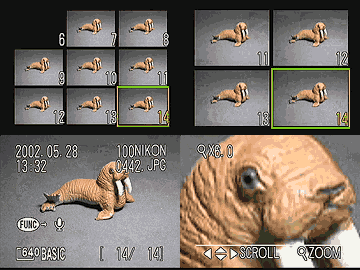 Also
in Playback mode, the LCD offers a thumbnail index display, showing either four
or nine images to a page depending on the setting. You can cycle between single-image,
four, or nine image views by pressing the wide-angle end of the zoom rocker button.
A playback zoom feature enlarges captured images up to 6x, letting you get a reasonably
good idea of how well-focused the image is, check the framing, and examine details
to see if you got the shot you wanted. A new feature in Playback mode is the Perspective
setting, which copies the displayed image and alters the vertical perspective.
Also
in Playback mode, the LCD offers a thumbnail index display, showing either four
or nine images to a page depending on the setting. You can cycle between single-image,
four, or nine image views by pressing the wide-angle end of the zoom rocker button.
A playback zoom feature enlarges captured images up to 6x, letting you get a reasonably
good idea of how well-focused the image is, check the framing, and examine details
to see if you got the shot you wanted. A new feature in Playback mode is the Perspective
setting, which copies the displayed image and alters the vertical perspective.

Follow Imaging Resource: