Minolta Dimage 7HiMinolta updates their revolutionary five-megapixel electronic SLR with an external flash sync connection, faster continuous mode, an "extra fine" JPEG option, and increased color space flexibility.<<Viewfinder :(Previous) | (Next): Exposure & Flash>> Page 5:OpticsReview First Posted: 10/15/2002 |
Optics
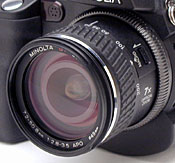 Equipped
with a 7.2-50.8mm, aspherical glass lens, the Dimage 7Hi's lens is equivalent
to a 28-200mm lens on a 35mm camera. This is a very nice range of focal lengths.
The 28mm wide angle setting is particularly welcome, since most digicam lenses
don't go that wide. Likewise, 200mm is a good medium telephoto length, about as
long as most folks can comfortably hand hold without image stabilization. Unlike
most digicams I've worked with, the lens zoom operates by rotating a collar around
the lens barrel, coupled mechanically to the lens elements themselves. I like
the precise control this gives, as opposed to the rocker switch controlled motor
that most digital cameras use to rack the lens in or out. It definitely requires
two hands, but the direct manual control will feel great to photographers accustomed
to film-based SLRs. (I will say that the action of the zoom lens feels a little
"cheap" though, with more of a plastic-on-plastic feel, rather than the smooth
lubricated-metal feeling I'm accustomed to in higher-end removable SLR lenses.)
Equipped
with a 7.2-50.8mm, aspherical glass lens, the Dimage 7Hi's lens is equivalent
to a 28-200mm lens on a 35mm camera. This is a very nice range of focal lengths.
The 28mm wide angle setting is particularly welcome, since most digicam lenses
don't go that wide. Likewise, 200mm is a good medium telephoto length, about as
long as most folks can comfortably hand hold without image stabilization. Unlike
most digicams I've worked with, the lens zoom operates by rotating a collar around
the lens barrel, coupled mechanically to the lens elements themselves. I like
the precise control this gives, as opposed to the rocker switch controlled motor
that most digital cameras use to rack the lens in or out. It definitely requires
two hands, but the direct manual control will feel great to photographers accustomed
to film-based SLRs. (I will say that the action of the zoom lens feels a little
"cheap" though, with more of a plastic-on-plastic feel, rather than the smooth
lubricated-metal feeling I'm accustomed to in higher-end removable SLR lenses.)The lens consists of 16 elements in 13 groups, including two AD (anomalous dispersion) glass elements and two aspheric surfaces. Aperture control can be either manual or automatic, with a maximum setting of f/2.8 at wide angle and f/3.5 at telephoto. Focus ranges from 1.6 feet (0.5 meters) to infinity in normal mode. Activated by a small switch on the lens barrel, a Macro focusing mode focuses in on objects as close as about 5.25 inches (13.3 centimeters) from the lens surface. You can enter Macro mode in either wide angle or telephoto lens positions. A plastic lens cap with spring-loaded catches hooks into the inside lip of the lens, protecting it from dirt and scratches. The lens cap does not have an eyelet for attaching a strap, so you'll want to take extra care not to lose it.
The Dimage 7Hi provides both manual and automatic focus control. The camera's specification sheet describes the autofocus system as a "Video AF system," which uses phase-detection focusing technology rather than the much more common contrast-detection system. The advantage is that the camera not only determines whether or not the lens is in focus, but also how far out of focus it is, and in which direction (near or far). With this information, the camera should be able to focus much more quickly, since it "knows" roughly how much, and in which direction, to adjust the focus, rather than having to "hunt" for the best focus at the outset. The AF system will still have to do some hunting for the best setting, but it should spend less time doing so than a contrast-based system. In my testing, I found that the Dimage 7Hi's AF system was indeed among the fastest I've found on a "prosumer" digicam, with shutter lags of only about 0.65 seconds in wide-area AF mode. (Switching to Spot Focus Point autofocus mode, as described below, increased shutter lag to about 0.83 seconds with the lens set to its maximum telephoto position, but kept it at 0.64 seconds with the lens at its wide angle setting.)
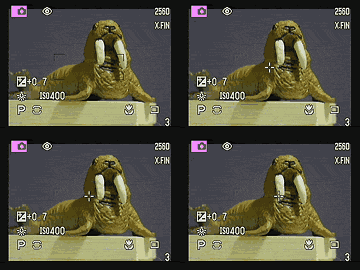 The
Dimage 7Hi's autofocus system offers both Single-Shot and Continuous AF settings.
In Single-Shot AF, the camera only sets the focus when the Shutter button is halfway
depressed. In Continuous AF mode, it adjusts focus at all times, continuously
keeping the frame in focus. You can also determine the area of the image the camera
uses to judge the focus, by selecting one of three autofocus options: Wide Focus
Area, Spot Focus Point, and Flex Focus Point. The default option is Wide Focus
area, indicated by a set of four widely-spaced brackets in the viewfinder image.
By pressing and holding down the center of the Four-Way Arrow controller pad,
the camera switches between Wide Area and Spot Point autofocusing modes (the latter
indicated by a target crosshair in the center of the viewfinder). If you release
the controller pad when the Spot AF target is displayed, you can then use the
four arrow buttons to move the target around the viewfinder area�this is what
Minolta calls Flex Focus Point AF. Wide Area AF bases its focus on the most prominent
subject detail in the portion of the image that falls within the AF brackets.
Spot Focus bases its focus on the very center of the frame, where the target crosshairs
reside. Finally, Flex Focus lets you move the focus point to anywhere within the
frame, by manually moving the target crosshairs around the image area with the
arrow buttons. See the screen shot above right, in which I switch from Wide Area
to Spot Focus, and then move the Flex Focus Point around the screen. As noted
earlier, the Spot Focus Point autofocus mode seems to increase shutter lag at
focal lengths other than wide angle.
The
Dimage 7Hi's autofocus system offers both Single-Shot and Continuous AF settings.
In Single-Shot AF, the camera only sets the focus when the Shutter button is halfway
depressed. In Continuous AF mode, it adjusts focus at all times, continuously
keeping the frame in focus. You can also determine the area of the image the camera
uses to judge the focus, by selecting one of three autofocus options: Wide Focus
Area, Spot Focus Point, and Flex Focus Point. The default option is Wide Focus
area, indicated by a set of four widely-spaced brackets in the viewfinder image.
By pressing and holding down the center of the Four-Way Arrow controller pad,
the camera switches between Wide Area and Spot Point autofocusing modes (the latter
indicated by a target crosshair in the center of the viewfinder). If you release
the controller pad when the Spot AF target is displayed, you can then use the
four arrow buttons to move the target around the viewfinder area�this is what
Minolta calls Flex Focus Point AF. Wide Area AF bases its focus on the most prominent
subject detail in the portion of the image that falls within the AF brackets.
Spot Focus bases its focus on the very center of the frame, where the target crosshairs
reside. Finally, Flex Focus lets you move the focus point to anywhere within the
frame, by manually moving the target crosshairs around the image area with the
arrow buttons. See the screen shot above right, in which I switch from Wide Area
to Spot Focus, and then move the Flex Focus Point around the screen. As noted
earlier, the Spot Focus Point autofocus mode seems to increase shutter lag at
focal lengths other than wide angle.The AF/MF button on the camera's left side toggles back and forth between Manual and Automatic focus modes. In Manual Focus mode, turning a ribbed ring around the base of the lens barrel adjusts focus. As you focus, a distance readout reports the current focal distance in meters or feet at the bottom of the LCD monitor (or EVF), under the MF icon. New on the Dimage 7i model and repeated on the 7Hi, the Direct MF menu option lets you manually tweak the autofocus selection without switching over to MF mode. You simply halfway press the Shutter button (triggering the autofocus system) and then turn the focus ring to adjust the focus. This is useful when the camera is having trouble focusing on a difficult subject, but isn't too far off the mark.
The Spot (AE/AF Lock) button, located in the upper right corner of the back panel (below the Mode Dial), locks the focus for a specific portion of the subject without having to hold the Shutter button down halfway. Pressing the button also locks exposure. You can configure this button in the Custom1 Record menu to switch between AF/AE Hold, AF/AE Toggle, AE Hold, or AE Toggle functions.
In addition to the 7x optical zoom, the Dimage 7Hi offers a 2x Digital zoom button, located at the very bottom of the back panel, on the right side. By default, pressing this button activates an instant 2x digital zoom. (Keep in mind that digital zoom simply enlarges the central portion of the CCD image digitally, rather than magnifying it optically and, as a result, image resolution is decreased in direct proportion to the magnification achieved.) In Manual Focus, this button produces a temporary magnification of roughly 4x as a focusing aid, which I found quite effective for evaluating the focus setting. Even relatively small movements of the focusing ring produced very noticeable changes in the magnified display. The manual-focus focus-assist magnification disappears as soon as you half-press the Shutter button, or press the magnify button a second time.
A set of 49mm filter threads around the inside lip of the lens accommodates Minolta's range of accessory filters and conversion lens kits. I really like having the fixed filter threads on the front element of the zoom lens, making it easy to attach auxiliary lenses and filters without any additional adapters or other gadgets. I do worry a little about the wisdom of hanging very much weight on the front of the telescoping lens assembly. I guess it will be fine for relatively lightweight attachments such as macro adapters and filters, but would be cautious with any sort of larger accessory lens.
In my testing, the lens of the Dimage 7Hi was really a high point of the camera's performance. (As was also the case with the original Dimage 7 and 7i.) I've become so accustomed to seeing optical defects in consumer and prosumer digicam lenses that I've become a little jaded in my outlook. In particular, virtually all consumer-level digicam lenses show significant softness in the corners of the images, and quite a bit of chromatic aberration as well. The lens on the Dimage 7Hi appears to be immune to these defects to a surprising degree, producing very sharp images corner to corner, with relatively little chromatic aberration to boot. The 7Hi's lens also has very little geometric distortion at either end of its focal length range. I measured only about 0.1% barrel distortion at wide angle, and only 0.35% pincushion at telephoto. Both numbers are very good, particularly for such a long-ratio zoom lens.
Reader Comments! --> Visit our discussion forum for the Minolta Dimage 7Hi!


Follow Imaging Resource: