Fuji FinePix 2800 ZoomTwo megapixels, a 6x zoom lens, great pictures, and a bargain price: Another great "value leader" from Fuji!<<Design :(Previous) | (Next): Optics>> Page 4:ViewfinderReview First Posted: 02/06/2002 |
Viewfinder
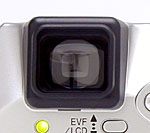 The FinePix 2800 Zoom offers both a TTL electronic optical viewfinder and an LCD monitor for composing images. The eyelevel viewfinder actually features a 0.55-inch, 110,000-pixel LCD display that shows the view through the lens. Though there is no diopter adjustment dial for the 2800 Zoom's viewfinder, it does have a fairly high eyepoint, and I had no trouble seeing the full frame with my eyeglasses on. Most eyeglass lenses shouldn't pose a problem. Electronic viewfinders like the 2800's are almost mandatory on digicams with zoom ratios longer than about 4x, as viewfinder zoom optics with a 6x zoom ratio would be prohibitively bulky and expensive. The drawback of electronic viewfinders though, is that they don't work well at all in dim lighting conditions: To keep the display "live", the camera has to use a relatively short exposure time on the CCD to generate the viewfinder image. This means that the camera can generally capture usable images in much dimmer conditions than the viewfinder will work in. The 2800 falls prey to this, as it's viewfinder isn't usable at light levels much below that of average residential interiors at night.(It really isn't usable for outdoor night scenes, even under fairly bright street lighting.) Still, under normal shooting conditions, the 2800's electronic viewfinder display is bright and quite sharp.
A small LED lamp beneath the viewfinder reports the camera's status, lighting a solid green when the camera is switched on. The LED flashes green and then lights solid when focus and exposure are set (if the LED continues flashing green, it means the camera cannot focus). The LED glows orange when images are being recorded to the SmartMedia card, and flashes orange when the flash is charging. The LED flashes red whenever the camera is warning of an error (the error message is reported on the LCD monitor).
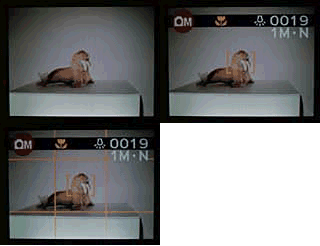 The 1.8-inch, D-TFT color LCD monitor is activated by pressing the EVF/LCD button on the back panel, which directs the display to the eyelevel viewfinder or LCD monitor. An information display shows details about the number of available images for the SmartMedia card, the resolution and quality settings, flash mode, and exposure mode. (The display would also include any features set through the Record menu, such as Macro mode, the self-timer, etc.) Pressing the Display button cycles through information display modes, showing the image with no information, the image with information, and finally an alignment grid, which divides the image area into thirds horizontally and vertically. (I really like alignment grids like this when I'm shooting buildings or other subjects where a slight tilt would be visible. Having horizontal and vertical references other than the edges of the frame really helps line things up.)
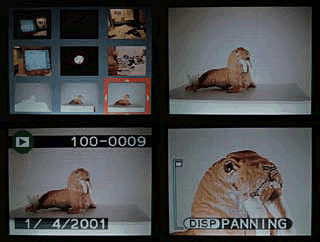 In Playback mode, the LCD monitor displays limited image information, such as the file number and date the image was captured. An index display mode shows as many as nine thumbnail-sized images on the screen at once, and a Playback zoom feature enlarges captured images as much as 5x letting you check on fine details and framing.


Follow Imaging Resource: