Minolta Dimage F300A compact, stylish camera with a full five-megapixel sensor and clever autofocus system.<<Design :(Previous) | (Next): Optics>> Page 4:ViewfinderReview First Posted: 05/22/2003 |
Viewfinder
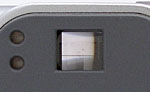 For composing images, the
F300 offers both a real-image optical viewfinder and a 1.5-inch TFT color LCD
monitor. The real-image optical viewfinder zooms along with the lens, but naturally
doesn't show any digital enlargement (which is only displayed on the LCD monitor).
The optical viewfinder doesn't have a diopter adjustment to accommodate near-
or far-sighted users, but does have an unusually high eyepoint. This means that
even people with very thick eyeglasses should have no problem seeing the full
image area through the eyepiece. (This is a very nice feature for those of us
who wear eyeglasses. Most camera viewfinders I've tested are usable with eyeglasses,
but I generally end up having to mash my glasses against the viewfinder eyepiece
to be able to see properly. With the F300, I could keep the camera a comfortable
distance from my eyeglasses, so I was less worried about scratching my lenses
if a speck of dirt gets between them and the viewfinder eyepiece.) Kudos to
Minolta for this feature!
For composing images, the
F300 offers both a real-image optical viewfinder and a 1.5-inch TFT color LCD
monitor. The real-image optical viewfinder zooms along with the lens, but naturally
doesn't show any digital enlargement (which is only displayed on the LCD monitor).
The optical viewfinder doesn't have a diopter adjustment to accommodate near-
or far-sighted users, but does have an unusually high eyepoint. This means that
even people with very thick eyeglasses should have no problem seeing the full
image area through the eyepiece. (This is a very nice feature for those of us
who wear eyeglasses. Most camera viewfinders I've tested are usable with eyeglasses,
but I generally end up having to mash my glasses against the viewfinder eyepiece
to be able to see properly. With the F300, I could keep the camera a comfortable
distance from my eyeglasses, so I was less worried about scratching my lenses
if a speck of dirt gets between them and the viewfinder eyepiece.) Kudos to
Minolta for this feature!
Two LED lamps on the left side of the viewfinder eyepiece report the camera's current status. For example, the top LED glows green when focus is locked, or flashes when the AF system is having difficulty focusing. The lower LED lamp lights solid orange when the flash is charged, and blinks while the flash is charging.
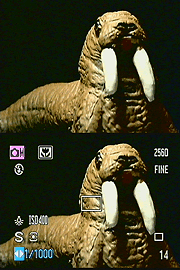 The
1.5-inch LCD monitor takes up the lower left portion of the F300's back panel,
and automatically activates whenever the camera is powered on. The Display button
just to the right controls the image and information display. One press disables
the information display, while the second press deactivates the LCD entirely,
while a third press reactivates the LCD with the information display showing.
Included in the information display are readouts showing the current camera
mode, flash mode, file size and quality settings, the number of available images,
a set of focus brackets in the center of the display, and the shutter speed
and aperture settings.
The
1.5-inch LCD monitor takes up the lower left portion of the F300's back panel,
and automatically activates whenever the camera is powered on. The Display button
just to the right controls the image and information display. One press disables
the information display, while the second press deactivates the LCD entirely,
while a third press reactivates the LCD with the information display showing.
Included in the information display are readouts showing the current camera
mode, flash mode, file size and quality settings, the number of available images,
a set of focus brackets in the center of the display, and the shutter speed
and aperture settings.
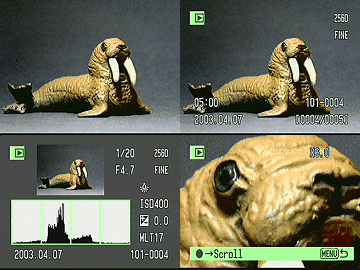 In
Playback mode, the Display button again controls the information display, but
also controls access to the nine-image thumbnail view of images stored on the
memory card. The Information button (also Flash button) activates a histogram
display, which graphs the tonal distribution of the image. This gives you some
idea of the tonal range you captured and helps make it easier to see any over-
or underexposure. Also in Playback mode, you can digitally enlarge the image as
much as 6x, using the Four-Way Arrow pad's zoom controls.
In
Playback mode, the Display button again controls the information display, but
also controls access to the nine-image thumbnail view of images stored on the
memory card. The Information button (also Flash button) activates a histogram
display, which graphs the tonal distribution of the image. This gives you some
idea of the tonal range you captured and helps make it easier to see any over-
or underexposure. Also in Playback mode, you can digitally enlarge the image as
much as 6x, using the Four-Way Arrow pad's zoom controls.


Follow Imaging Resource: