Canon Powershot G6By: Dave EtchellsThe next generation of Canon's popular "G" model updates the line with a larger, 7.1-megapixel CCD and a redesigned camera body. <<Image Storage & Interface :(Previous) | (Next): Test Results & Conclusion>> Page 12:Video, Power, SoftwareReview First Posted: 09/28/2004 |
Video Out
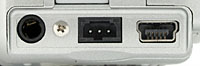 The G6 has a video-out port with a choice
of NTSC timing format, for US and Japanese model televisions, or
PAL timing format for European televisions, which are selectable
through the Play menu. The video output can be used for reviewing
previously recorded images or running slide shows from the camera.
It also shows all three LCD menu screens, as well as the preview
display from the LCD viewfinder. Combined with the very flexible
controls of the wireless remote transmitter, the live video output
display opens up interesting possibilities for portrait
photography, such as using a video monitor as a remote
viewfinder.
The G6 has a video-out port with a choice
of NTSC timing format, for US and Japanese model televisions, or
PAL timing format for European televisions, which are selectable
through the Play menu. The video output can be used for reviewing
previously recorded images or running slide shows from the camera.
It also shows all three LCD menu screens, as well as the preview
display from the LCD viewfinder. Combined with the very flexible
controls of the wireless remote transmitter, the live video output
display opens up interesting possibilities for portrait
photography, such as using a video monitor as a remote
viewfinder.
The output cable is a true A/V cable, as it fans out into two RCA jacks, one for video, and one for audio. Plugged into any video monitor (or TV with direct video and audio inputs), the audio capabilities of the G6, combined with the wireless remote control, should make it an effective portable presentation device.
Power
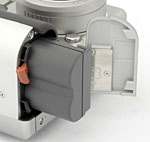 The G6 is powered by an internal
BP-511A rechargeable lithium-ion battery pack, a LiIon design that packs quite
a wallop (meaning long run times). For users who already own other products
with similar batteries, the G6 can also accept the BP-514 / BP-511 / BP-512
types, although battery life will vary depending on the type used. The camera
ships with one BP-511A battery pack (with which we did our testing). The battery
charger included with the G6 charges the battery outside the camera, allowing
you to have a second battery charging while the camera is in use (a positive
change from the G5's in-camera charger). This does mean that the AC adapter
is now an optional extra, however, and since the included "folding prongs"-style
charger plugs directly into the wall without a cable, the charger may block
access to nearby power points when in use. Also available is a dual external
battery charger for charging two batteries simultaneously, and a car battery
cable, which plugs into an automobile cigarette lighter. A CR2016 lithium battery
keeps the G5's internal clock going, and fits into a small plastic "sled" that
stows neatly in one side of the main battery chamber. This sled is rather fiddly
to remove with large fingers, and the battery equally fiddly to remove from
the sled, but neither operation will need to be done particularly frequently.
The G6 is powered by an internal
BP-511A rechargeable lithium-ion battery pack, a LiIon design that packs quite
a wallop (meaning long run times). For users who already own other products
with similar batteries, the G6 can also accept the BP-514 / BP-511 / BP-512
types, although battery life will vary depending on the type used. The camera
ships with one BP-511A battery pack (with which we did our testing). The battery
charger included with the G6 charges the battery outside the camera, allowing
you to have a second battery charging while the camera is in use (a positive
change from the G5's in-camera charger). This does mean that the AC adapter
is now an optional extra, however, and since the included "folding prongs"-style
charger plugs directly into the wall without a cable, the charger may block
access to nearby power points when in use. Also available is a dual external
battery charger for charging two batteries simultaneously, and a car battery
cable, which plugs into an automobile cigarette lighter. A CR2016 lithium battery
keeps the G5's internal clock going, and fits into a small plastic "sled" that
stows neatly in one side of the main battery chamber. This sled is rather fiddly
to remove with large fingers, and the battery equally fiddly to remove from
the sled, but neither operation will need to be done particularly frequently.
Because the G6 relies on its LCD display for viewing and selecting some of its settings, it can be somewhat of a drain on the power supply. Fortunately, the camera has an automatic shutdown mode (three minutes in Record mode, five minutes in Playback mode) to help conserve battery power, and you can control power consumption by reducing your use of the color LCD monitor (in favor of the optical viewfinder and top-mounted info LCD), as well as keeping the autofocus mechanism in Single mode rather than Continuous mode.
Unfortunately, the PowerShot G6's proprietary power connector prevented me from conducting my usual detailed power-drain measurements. It's safe to say though, that the G6 offers very long battery life, given that Canon claims a 300-shot battery life, based on the CIPA industry standard. (A fairly conservative rating standard, which includes use of the flash on a percentage of the images. The spec calls for shooting an image every 20 seconds, running the lens back and forth between wide angle and telephoto focal lengths, using the flash every 4th shot, and turning the camera on and off after every 8th shot.) Canon also claims approximately 400 minutes of run time in Playback mode, which is longer than the 312 minutes I projected for the G5. (Although my standard and Canon's may differ, so the G5 and G6 numbers many not be directly comparable.)
Included Software
The Canon PowerShot G6 comes with a software CD containing the latest versions of Canon's digital software, which provides a wealth of utilities. Compatible with Windows and Macintosh operating systems, the software package allows you to download images from the camera, process RAW data files, stitch together images shot in Stitch-Assist mode, set up images for printing, and operate the camera remotely from the computer. Also included is a second software CD loaded with ArcSoft Camera Suite 2.1, also for both PC and Macintosh formats. The suite includes PhotoStudio, for editing images, and VideoImpression, for editing movie files.
This latest edition of Canon's RemoteCapture software seems to be more capable than earlier versions. RemoteCapture is something that most will never use, but a few who discover it will find RemoteCapture indispensable. You actually see a live image from the camera on your screen, and every picture you take is loaded onto the computer. You can control nearly every aspect of the camera, including ISO, White Balance, Zoom, flash and EV settings, and of course shutter speed and aperture. Captured images are sent directly to the computer. It's pretty impressive...
In the Box
Included in the box with the PowerShot G6 are the following items:
- Lens cap with strap.
- Neck strap.
- BP-511A rechargeable lithium-ion battery pack.
- Battery charger .
- Wireless remote control.
- 32MB CompactFlash Type I memory card.
- USB cable.
- AV cable.
- Software CDs.
- User Guide and registration kit.


Follow Imaging Resource: