Nikon D100Nikon ups the ante with 6 million pixels, superb color and resolution, at a 'bargain' price!<<Design :(Previous) | (Next): Optics>> Page 4:ViewfinderReview First Posted: 5/31/2002 |
Viewfinder
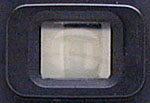 Like
other SLRs, the D100 uses an optical viewfinder that works through the lens. (The
LCD monitor is for image playback and accessing the menu system.) A sliding diopter
adjustment control adjusts the focusing of the viewfinder optics to accommodate
eyeglass wearers, and the viewfinder also has quite a high eyepoint (meaning you
can see the full frame with your eye a good distance from the rear objective).
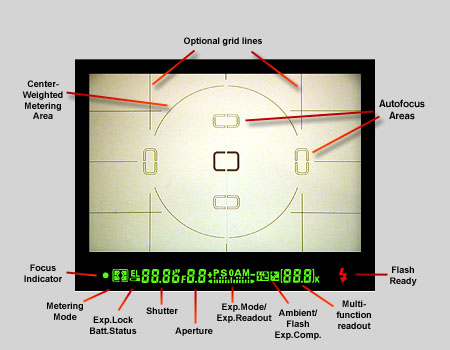
An illuminated display inside the viewfinder provides detailed exposure and camera
information, including focus area indicators, shutter speed, aperture, exposure
mode, metering, AE lock, exposure and flash compensation, frame counter, ready
light, and five sets of focus brackets. When activated, the view also includes
an alignment grid, useful for lining up difficult shots. A large circular outline
in the center of the view indicates the Center-Weighted metering area. The optional
grid (enabled via Custom Menu setting number 19) and focus area indicators can
be set to illuminate briefly when the shutter button is half-pressed, through
Custom Menu setting number 18. The shot below shows the viewfinder display, with
all segments of the readout illuminated.
Like
other SLRs, the D100 uses an optical viewfinder that works through the lens. (The
LCD monitor is for image playback and accessing the menu system.) A sliding diopter
adjustment control adjusts the focusing of the viewfinder optics to accommodate
eyeglass wearers, and the viewfinder also has quite a high eyepoint (meaning you
can see the full frame with your eye a good distance from the rear objective).
An illuminated display inside the viewfinder provides detailed exposure and camera
information, including focus area indicators, shutter speed, aperture, exposure
mode, metering, AE lock, exposure and flash compensation, frame counter, ready
light, and five sets of focus brackets. When activated, the view also includes
an alignment grid, useful for lining up difficult shots. A large circular outline
in the center of the view indicates the Center-Weighted metering area. The optional
grid (enabled via Custom Menu setting number 19) and focus area indicators can
be set to illuminate briefly when the shutter button is half-pressed, through
Custom Menu setting number 18. The shot below shows the viewfinder display, with
all segments of the readout illuminated.
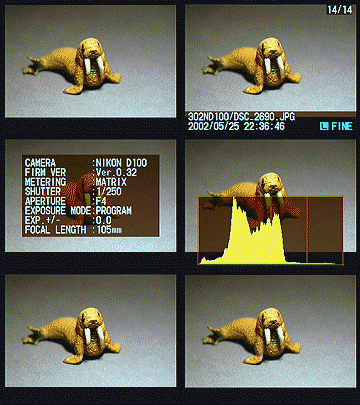
Like those on essentially all digital SLRs, the LCD panel on the D100 isn't
usable as a viewfinder. It does, however, provide a great deal of information
about your pictures after you've shot them. No less than seven different display
screens are available, ranging from no information at all, to a very detailed
list of the exposure information, to a histogram display. A common feature
among other professional digicams, the histogram is simply a graph of how
many pixels in the image have each brightness level. The brightness is the
horizontal axis, running from black at the left to white at the right. The
height of the graph shows the relative number of pixels at that brightness
level. This sort of display is very handy for determining under- or overexposure.
With an evenly-exposed, low-contrast subject, the histogram would stretch
across the entire width of the display, using the full range of brightness
values available. An underexposed image will have a histogram with all the
data lumped on the left-hand side, with nothing reaching all the way to the
right. Likewise, an overexposed image will have all the data lumped on the
righthand side.
Another useful display mode, carried over from the D1 and D1x models, is the Highlights display, which "blinks" any highlights that are saturated all the way to pure white. It does this by toggling the pure white areas on the LCD between white and black. This is another area though, where I had a minor quibble with the D100's designers. In other cameras I've used with a "blink" mode (the D1x included), only those areas that were actually blown out to pure white blinked. On the D100,the "blink" extends into regions that in fact don't appear to be completely saturated. When I first started using the D100, I paid too much attention to the blinking display and ended up underexposing several shots. Eventually, I became accustomed to what the blinking display on the D100 corresponded to in terms of exposure, but was left with an uncomfortable feeling that I didn't really know what was going on with the exposure of my subjects. What it seems to be doing is blinking whenever any one of the RGB channels is saturated. This is probably a good thing, but I'd really like to have some way to tell which channels were blowing out, and/or a way to adjust the level of sensitivity of the display.
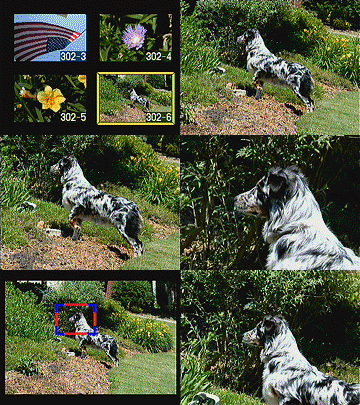
The D100 also offers greatly expanded options for display magnification relative to earlier Nikon D-SLRs. You have the normal thumbnail or normal-sized displays available, but can also enlarge the display up to 4x to examine critical focus and framing. The animated series of screen shots below show how this works. As you enter a zoomed playback mode, the display changes from a 3:2 aspect ratio view showing all of the image to a 4:3 one, matching the dimensions of the LCD monitor. Pressing the Thumbnail Display button while rotating the Main Control Dial zooms in on the image. Once zoomed, you can use the Four-Way Rocker Pad control to scroll around within the larger image. Holding down the Thumbnail Display button while rotating the Sub-Command Dial toggles to a display showing the position of your zoomed window within the normal-sized image, indicated by a bold red outline. You can move this window around with the Rocker Pad control, and then pop back into the zoomed view by once again holding down the Thumbnail Display and turning the Sub-Command dial. - This all sounds a little complicated, and it is, but after a little acclimatization, I found I could move around within the enlarged display very fluidly using this arrangement. - See the animated screen shot below for a whirlwind tour of the feature.


Follow Imaging Resource: