Sony CyberShot DSC-P50Sony develops an affordable, full-featured 2.1-megapixel compact digicam with great picture quality!<<Operation & User Interface :(Previous) | (Next): Image Storage & Interface>> Page 9:Camera Modes & MenusReview First Posted: 4/4/2001 |
Camera Modes and Menus
 Twilight Mode: Optimizes the camera for shooting in low-light situations such as city night scenes or dusk (moon symbol). Twilight mode extends the available shutter speeds to include up to two-second exposures. Aperture and shutter speed are automatically controlled, but the user has control over all other exposure variables, with the exception of ISO.
 Automatic Record Mode: The green camera symbol on the Mode dial indicates the Automatic exposure mode. Here, the camera controls aperture and shutter speed settings while the user controls the remaining exposure features. The slowest shutter speed available is 1/15 second.
 Playback Mode: Marked on the Mode dial with the traditional playback symbol, Playback mode allows users to review captured images and movies on the Memory Stick. Images can be deleted, write-protected, resized, rotated, viewed in a slide show, or Setup for DPOF printing. Video files can be edited with the Divide function.
 Movie Mode: Designated on the Mode dial by a film frame, Movie mode sets up the camera for recording moving images without sound, or clip motion files.
 Setup Mode: Immediately displays the following Setup menu screens:
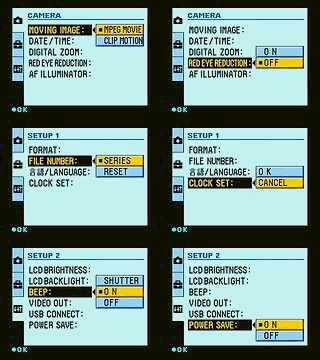 Moving Image: Establishes the movie recording mode: MPEG Movie or Clip Motion.
- Date/Time: Determines whether or not the date and/or time is recorded with the image. Choices are Off, Date, and Day & Time.
- Digital Zoom: Turns the 2x digital telephoto function on or off.
- Red-Eye Reduction: Enables or disables the Red-Eye Reduction flash mode.
- AF Illuminator: Turns the AF Illuminator lamp on the front of the camera on or off.
- Format: Formats the Memory Stick, erasing all images.
- File Number: Determines the file number sequence. Normal resets the file numbering with each new card inserted into the memory slot. Series continues the file numbering from card to card.
- Language: Sets the menu language to English or Japanese.
- Clock Set: Sets the camera's internal clock and calendar.
- LCD Brightness: Adjusts the LCD's brightness level to Bright, Normal, or Dark.
- LCD Backlight: Controls the LCD backlight function, which brightens the screen in sunny shooting situations. Options are Normal and Bright.
- Beep: Controls the camera's operating sounds. Choices are Shutter (noise with shutter only), On (activates all camera noise), and Off (silences the camera).
- Video Out: Sets the video signal to NTSC or PAL timing.
- USB Connect: Establishes the type of USB connection: Normal or PTP.
- Power Save: Activates the power save function, which automatically shuts off the camera after a period of inactivity.
Capture Menu: The main capture menu is accessible in all capture modes by pressing the Menu button. Not all menu options are available in all capture modes.
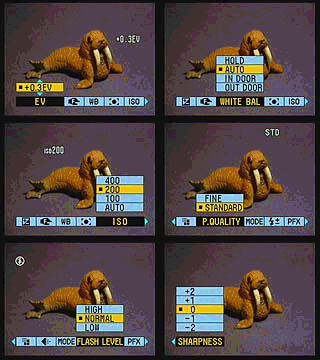 Exposure Compensation (EV): Adjusts the exposure from -2 to +2 exposure equivalents (EV) in one-third-step increments.
- Focus: Puts the camera in Auto focus mode, or fixes focus at 0.5, 1.0, 3.0, 7.0 meters, or infinity.
- White Balance: Adjusts the camera's white balance to accommodate a variety of light sources. Options are Hold (manual setting), Auto, Indoors, and Outdoors.
- Spot Meter: Turns spot metering on or off.
- ISO: Changes the camera's light sensitivity level. Choices are Auto, 100, 200, and 400 ISO equivalents (Automatic record mode only).
- Image Size: Sets the pixel resolution to 1,600 x 1,200, 1,600 (3:2 ratio), 1,024 x 768, or 640 x 480 for still images. Movie file sizes are 320 x 240 or 160 x 11 pixels. Clip Motion file sizes are Normal (160 x 120 pixels) or Mobile (80 x 72 pixels).
- Picture Quality: Sets the JPEG compression level to Fine or Standard.
- Record Mode: Accesses the following recording modes:
- TIFF: Records images in the uncompressed TIFF file format (one at the 1,600 x 1,200 resolution size, in addition to another image at the set JPEG compression and resolution levels).
- Text: Captures black and white images of text on black boards or white boards. Images are saved in the GIF format.
- E-Mail: Sets the image file size to 320 x 240 pixels to make e-mail transmission easier.
- Normal: Returns the camera to normal still capture mode.
- Flash Level: Assigns the flash intensity level to High, Normal, or Low.
- Picture Effects: Activates a variety of creative picture effects modes, including Solarize, Black and White, Sepia, and Negative Art. The Off setting returns the camera to normal capture mode.
- Sharpness: Adjusts the image sharpness from -2 to +2 in five settings (zero being the normal sharpness level). (Automatic and Twilight record modes only.)
Playback Menu: As with the capture menu, the Playback menu is accessed by pressing the Menu button when in Playback mode. The following options are available:
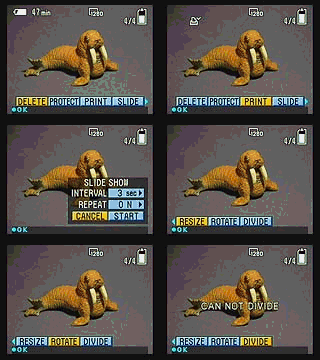 Delete: Deletes the current image, with an option to cancel.
- Protect: Write-protects the currently displayed image from accidental erasure or manipulation in any other way (except for card formatting, which deletes all images).
- Print: Marks the current image for printing on a DPOF device.
- Slide: Activates an automatic slide show of all images on the card. You can define the interval between pictures and whether or not the slide show repeats itself.
- Resize: Resizes the currently displayed image to 1,600 x 1,200, 1,024 x 768, or 640 x 480 pixels.
- Rotate: Rotates the displayed image 90 degrees counterclockwise or clockwise.
- Divide: Activates the in-camera movie editing process, which actually "divides" a single movie into two, three, or more pieces.


Follow Imaging Resource: