HP PhotoSmart 618HP's capable mid-level model offers 2.1 megapixels, an optical zoom lens, and ease-of-use.<<Optics :(Previous) | (Next): Shutter Lag & Cycle Time Tests>> Page 6:Exposure & FlashReview First Posted: 03/19/2001 |
 Exposure
The PhotoSmart 618 features a much wider array of exposure controls than the HP 215 and 315 digicams. Though the 618 doesn't feature a fully manual exposure mode, it does offer Aperture Priority and Shutter Priority options, in addition to Auto, Landscape, Portrait, and Action exposure modes. Exposure modes are controlled through the Capture menu, under the Photo Assist>Exposure Mode sub-menus. In standard Auto exposure mode, the camera controls both the shutter speed and aperture settings, while the user maintains control over EV Compensation, White Balance, AE Metering, ISO Speed. Shutter Priority mode allows the user to set the shutter speed, from 1/1,000 to four seconds, while the camera chooses the best aperture setting to obtain a good exposure. Aperture Priority mode gives the user control over the lens aperture, from f/2.4 to f/9.6, while the camera selects the best corresponding shutter speed. In both modes, the up and down arrow keys adjust the exposure values. If the camera's metering system disagrees with your settings, the exposure value readout in the top overlay of the LCD monitor will turn red.
 The 618 also offers Landscape, Portrait, and Action exposure modes for shooting in specific situations. Landscape mode fixes the focus at the infinity setting and uses a smaller lens aperture to capture a greater depth of field (keeping the background and foreground in sharp focus). Because this mode uses smaller aperture settings, which typically require a slower shutter speed, a tripod is recommended to prevent blurring from camera movement. Portrait mode employs a larger aperture setting to decrease the depth of field, which places the subject in sharp focus and blurs the background, placing all the emphasis on the subject. Action mode optimizes the camera for shooting fast subjects, using a faster shutter speed to freeze action.
An Instant Review function automatically displays the recently captured image on the LCD screen for a few seconds while the image is being written to the memory card. During this time, you can delete the image on the spot by pressing the soft key labeled "Delete" before the image disappears. The Instant Review function is controlled through the camera's Capture menu under the Preferences and Display submenus, where you can turn off the Instant Review or set the length of time that the review displays on the monitor.
Exposure compensation is adjustable from -2 to +2 exposure equivalents (EV) in one-half-step increments, through the Photo Assist menu (we'd prefer to see an external control for this, to bypass the LCD). White balance is also adjustable, with Auto, Daylight, Tungsten, and Fluorescent lighting options. Three metering modes are available under the AE Metering submenu. Average metering (the default setting) averages readings from the entire image area to determine the best exposure. Center-Weighted metering takes several readings from a large area in the center of the image, then averages them to find the best overall exposure. Spot metering bases the exposure on a single reading taken from the very center of the image. This last mode is useful for backlit or high-contrast subjects, where an averaged reading would not give you the correct exposure for the subject.
In both the Auto and Aperture Priority exposure modes, the 618's ISO can be set to Auto, 100, or 200 ISO equivalents. (The ISO setting is grayed-out in the Photo Assist menu when operating in Shutter Priority, Landscape, Portrait, or Action capture modes, when the camera assumes automatic control). Color is set through the Capture Settings menu (File Settings submenu) to Full Color, Black and White, and Sepia options.
A Self-Timer/Remote Control button on top of the camera controls the camera's Remote and Self-Timer capture modes. One press of the button enables the Self-Timer mode, which counts down from 10 seconds before taking the exposure (after the shutter button is fully pressed). A second press of the Remote/Self-Timer button puts the camera into Remote Control mode, which works with the accompanying IR Remote Control. When the shutter button on the IR Remote is pressed, the camera counts down from three seconds before firing the shutter. A third press of the control button places the camera back into normal exposure mode.
 Flash
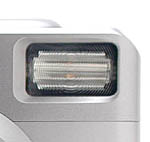
FlashThe PhotoSmart 618's built-in flash features seven operating modes: Auto, Auto with Red-Eye Reduction, Forced On, Forced On with Red-Eye Reduction, Forced Off, Night, and Night with Red-Eye Reduction. The Flash button on top of the camera controls each mode setting, cycling between them. The Auto mode places the camera in charge of when to fire the flash, based on the existing lighting conditions. Forced On fires the flash with every exposure, regardless of light level, while Forced Off completely disables the flash. The Night setting synchronizes the flash with a slow shutter speed, allowing more ambient light in to balance the exposure. Auto, Forced On, and Night modes also feature a Red-Eye Reduction mode, which fires a small pre-flash before firing the flash at full power with the exposure. This reduces the occurrence of red-eye effect, which is caused by a reflection through the subject's pupils. Hewlett-Packard estimates the 618's flash to be effective from 0.98 to 18.0 feet (0.3 to 5.4 meters).
 Sound Recording
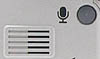
A tiny microphone on the front of the camera enables the user to record up to 45 seconds of sound per captured image. To record sound in Capture mode, the Instant Review function must be turned on in the Preferences menu (Display submenu). Once an image has been captured, you press the Sound button on the camera's back panel while the review screen is active. The amount of available recording time appears on the LCD monitor, and the camera records sound until the Sound button is pressed a second time. (For best results, make sure to talk into the microphone on the front of the camera.)
After you've finished the recording, you can use the soft keys below the LCD to playback or delete the recording, or exit the Instant Review screen. Playback sound issues from a small speaker grille on the rear panel of the camera, next to the microphone button. You can also record sound in Playback and Review modes, by selecting the image to which you'd like to attach the recording, and following the same procedure as above. In addition to One-Shot images, you can attach sound clips to the final image of a Continuous series or the first image of a Time-Lapse series.
Special Capture Modes
The 618 offers three main photography modes: One-Shot, Continuous, and Time-Lapse. The far left soft key controls the photography mode, cycling between the three. One-Shot mode is the default mode, it captures a single image with one press of the shutter button. In Continuous mode, the camera captures a rapid series of images for as long as the shutter button is held down, or until the memory card runs out of room. You can use the flash in Continuous mode, but this increases the shot-to-shot cycle time as you have to wait for the flash to charge between shots.
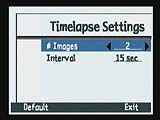 Time-Lapse photography mode allows you to capture up to 1,000 images in a series, at specific time intervals (from 15 seconds to 24 hours). Shooting begins with a single press of the shutter button and ends when the preset number of images is reached (you can cancel the mode at any time by pressing the Stop soft key). The actual number of images that can be recorded depends on the amount of available space on the CompactFlash card. Images are saved as a group of images on the memory card, which means they are linked together as a series.
Image Stamp Menu
 An Image Stamp menu in the 618's Capture menu allows you to add text or a logo to captured images. Using the Date & Time submenu you can opt to have the date, time, or both stamped on the image. The Text submenu allows you to print your own messages on the image, by scrolling through and selecting individual letters from the alphabet. In both Date & Time and Text menu options, you can designate the placement of the text in the frame, the transparency of the words, the text color, and the background color. The Logo submenu allows you to download preset logos from the Hewlett-Packard Web site (www.hp.com/photosmart) and paste them into one of the four corners of the picture.
Reader Comments! --> Visit our discussion forum for the HP PhotoSmart 618!


Follow Imaging Resource: