Minolta Dimage RD3000Unusual 2-CCD design produces a professional-level SLR digicam at an affordable price.<<Operation & User Interface :(Previous) | (Next): Image Storage & Interface>> Page 9:Camera Modes & MenusReview First Posted: 5/23/2000 |
Camera Modes and Menus
Record Mode: Accessed by turning
the mode dial to the Record position (either 1 or 2), this mode sets up the
camera to record images in one of four exposure modes. The secondary Record
position does the same but also enables an automatic Quick View feature which
displays the just-captured image on the LCD monitor for eight seconds, as soon
as it has been saved to the memory card. The following exposure modes are
available in both Record modes:
- Program: the camera selects both the aperture and shutter speed
values based on existing light levels.
- Aperture Priority: you set the aperture value (the range of which
varies with each lens), while the camera determines the correct shutter
speed.
- Shutter Priority: you set the shutter speed value, from two to
1/2000 seconds, while the camera determines the correct aperture (varies with
each lens).
- Manual: you have control over both aperture and shutter speed
values with an increased shutter speed range of 30 to 1/2000 seconds.
Playback Mode: Accessed by turning the mode dial to the Play position, this mode allows you to review captured images. Pressing the Menu button calls up the following settings menu:
- SCSI: sets up the camera for connecting to a computer via the SCSI
interface. Allows you to select SCSI IDs from 0 through 7. (Be careful not to
select 7 in most cases though, as computers generally have their own interface
set to that ID number.) You can also enable or disable the internal
termination for the SCSI bus, a nice touch that eliminates the need for a
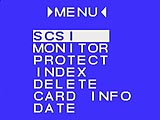 cumbersome external terminator.
- Monitor: lets you adjust the LCD brightness and contrast.
- Protect: write protects individual images from accidental erasure
(except from card formatting).
- Index: sets the index display mode to show either four or nine
thumbnail images.
- Delete: deletes the individual image, all images or formats the
CompactFlash card.
- Card Info: displays CompactFlash information, including the total
amount of space, the amount of space remaining, recorded frames and the number
of available frames for each quality setting.
- Date: sets the camera's internal date and time.


Follow Imaging Resource: