Canon PowerShot S60An already sleek 5 megapixel design is updated and improved with a 28mm wide angle lens and new control and menu system.<<Design :(Previous) | (Next): Optics>> Page 4:ViewfinderReview First Posted: 05/10/2004, Updated: 06/28/2004 |
Viewfinder
 The
S60 features both an eye-level optical viewfinder and a 1.8-inch LCD monitor
on the back panel for image composition. The real-image optical viewfinder zooms
along with the lens (except in Digital Telephoto mode, which requires the LCD
monitor), and displays incomplete crosshairs (they don't actually cross) in
the center of its screen. While there's no dioptric adjustment to adapt the
viewfinder optics to your vision, the eyepiece does have an unusually high "eyepoint,"
making it well-suited to eyeglass wearers. Two LED lights next to the viewfinder
report the camera's status during certain operations. For example, when you
depress the Shutter button halfway, a steady orange light (on top) indicates
that the camera is ready to record; a flashing green light indicates that an
image is either being written to, read from, or erased from the CompactFlash
card; a steady orange light (on top) indicates that the camera is ready to record;
and a flashing orange light indicates a camera-shake warning (i.e. the shutter
speed is too slow to handhold), or the battery is charging. The lower LED light
glows yellow when the camera is set in Macro or Manual focus modes, and flashes
yellow when focus cannot be achieved.
The
S60 features both an eye-level optical viewfinder and a 1.8-inch LCD monitor
on the back panel for image composition. The real-image optical viewfinder zooms
along with the lens (except in Digital Telephoto mode, which requires the LCD
monitor), and displays incomplete crosshairs (they don't actually cross) in
the center of its screen. While there's no dioptric adjustment to adapt the
viewfinder optics to your vision, the eyepiece does have an unusually high "eyepoint,"
making it well-suited to eyeglass wearers. Two LED lights next to the viewfinder
report the camera's status during certain operations. For example, when you
depress the Shutter button halfway, a steady orange light (on top) indicates
that the camera is ready to record; a flashing green light indicates that an
image is either being written to, read from, or erased from the CompactFlash
card; a steady orange light (on top) indicates that the camera is ready to record;
and a flashing orange light indicates a camera-shake warning (i.e. the shutter
speed is too slow to handhold), or the battery is charging. The lower LED light
glows yellow when the camera is set in Macro or Manual focus modes, and flashes
yellow when focus cannot be achieved.
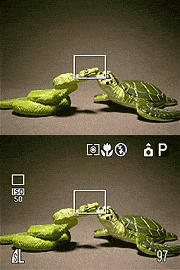 Measuring
1.8 inches diagonally, Canon's low-temperature, polycrystalline silicon, TFT,
color LCD monitor automatically displays camera settings when the camera is
powered on. LCD brightness can be adjusted to either of two levels via the setup
menu, and the screen seemed to have better than average visibility in sunlight.
The Display button controls the image and information display. One press shows
the image without settings, and two presses show the image with settings. Depending
on the Shooting mode, the LCD reports the flash setting, drive mode, metering
mode, image size and quality, and the number of frames remaining. Additional
functions are shown as they are enabled and battery status is only displayed
when power is low. A third press of the Display button cancels both displays.
Measuring
1.8 inches diagonally, Canon's low-temperature, polycrystalline silicon, TFT,
color LCD monitor automatically displays camera settings when the camera is
powered on. LCD brightness can be adjusted to either of two levels via the setup
menu, and the screen seemed to have better than average visibility in sunlight.
The Display button controls the image and information display. One press shows
the image without settings, and two presses show the image with settings. Depending
on the Shooting mode, the LCD reports the flash setting, drive mode, metering
mode, image size and quality, and the number of frames remaining. Additional
functions are shown as they are enabled and battery status is only displayed
when power is low. A third press of the Display button cancels both displays.
 In
Replay mode, the LCD monitor provides a full-frame display of captured images,
which you can view individually by scrolling left or right with the arrow buttons
on the Multicontroller. Depressing the Flash / Index button brings up a thumbnail
index display of nine images at a time, which you can also scroll through with
the arrow buttons. The Zoom rocker doubles as a Digital Enlargement button (marked
by magnifying glasses), which allows you to enlarge an image up to 10x its normal
size on the screen. Playback magnification begins at 2x, and proceeds in fairly
smooth steps to the maximum of approximately 10x. This degree of enlargement
is very handy, as it's sufficient to check focus accuracy and depth of field,
something that's difficult to do on cameras with lower playback magnification.
The arrow keys permit you to move around the enlarged image and check fine details.
In
Replay mode, the LCD monitor provides a full-frame display of captured images,
which you can view individually by scrolling left or right with the arrow buttons
on the Multicontroller. Depressing the Flash / Index button brings up a thumbnail
index display of nine images at a time, which you can also scroll through with
the arrow buttons. The Zoom rocker doubles as a Digital Enlargement button (marked
by magnifying glasses), which allows you to enlarge an image up to 10x its normal
size on the screen. Playback magnification begins at 2x, and proceeds in fairly
smooth steps to the maximum of approximately 10x. This degree of enlargement
is very handy, as it's sufficient to check focus accuracy and depth of field,
something that's difficult to do on cameras with lower playback magnification.
The arrow keys permit you to move around the enlarged image and check fine details.
 By default, the LCD screen displays basic information about the captured images,
including the file name, date, and time it was recorded, compression, resolution,
and what number it is in the sequence of images stored on the memory card. Depressing
the Display button once brings up a thumbnail view of the image with more detailed
information such as the shooting mode, aperture, f/stop, exposure compensation,
and metering mode. In addition, the screen shows a histogram next to the image
to indicate the distribution of tonal values. Besides the histogram display
(and actually much more useful), any blown-out highlights in the image will
blink from white to black and back again, letting you see exactly where detail
has been lost. (I particularly like this form of display, applaud Canon for
including it, and hope to see even more manufacturers adopt it in the future.)
By default, the LCD screen displays basic information about the captured images,
including the file name, date, and time it was recorded, compression, resolution,
and what number it is in the sequence of images stored on the memory card. Depressing
the Display button once brings up a thumbnail view of the image with more detailed
information such as the shooting mode, aperture, f/stop, exposure compensation,
and metering mode. In addition, the screen shows a histogram next to the image
to indicate the distribution of tonal values. Besides the histogram display
(and actually much more useful), any blown-out highlights in the image will
blink from white to black and back again, letting you see exactly where detail
has been lost. (I particularly like this form of display, applaud Canon for
including it, and hope to see even more manufacturers adopt it in the future.)
As is often the case in digicams with both optical and LCD viewfinders, the S60's viewfinder is rather tight, showing only 82 percent of the final image area, at all lens zoom settings. Thankfully though, the S60's LCD viewfinder is essentially perfect, showing exactly what the camera will ultimately capture.


Follow Imaging Resource: